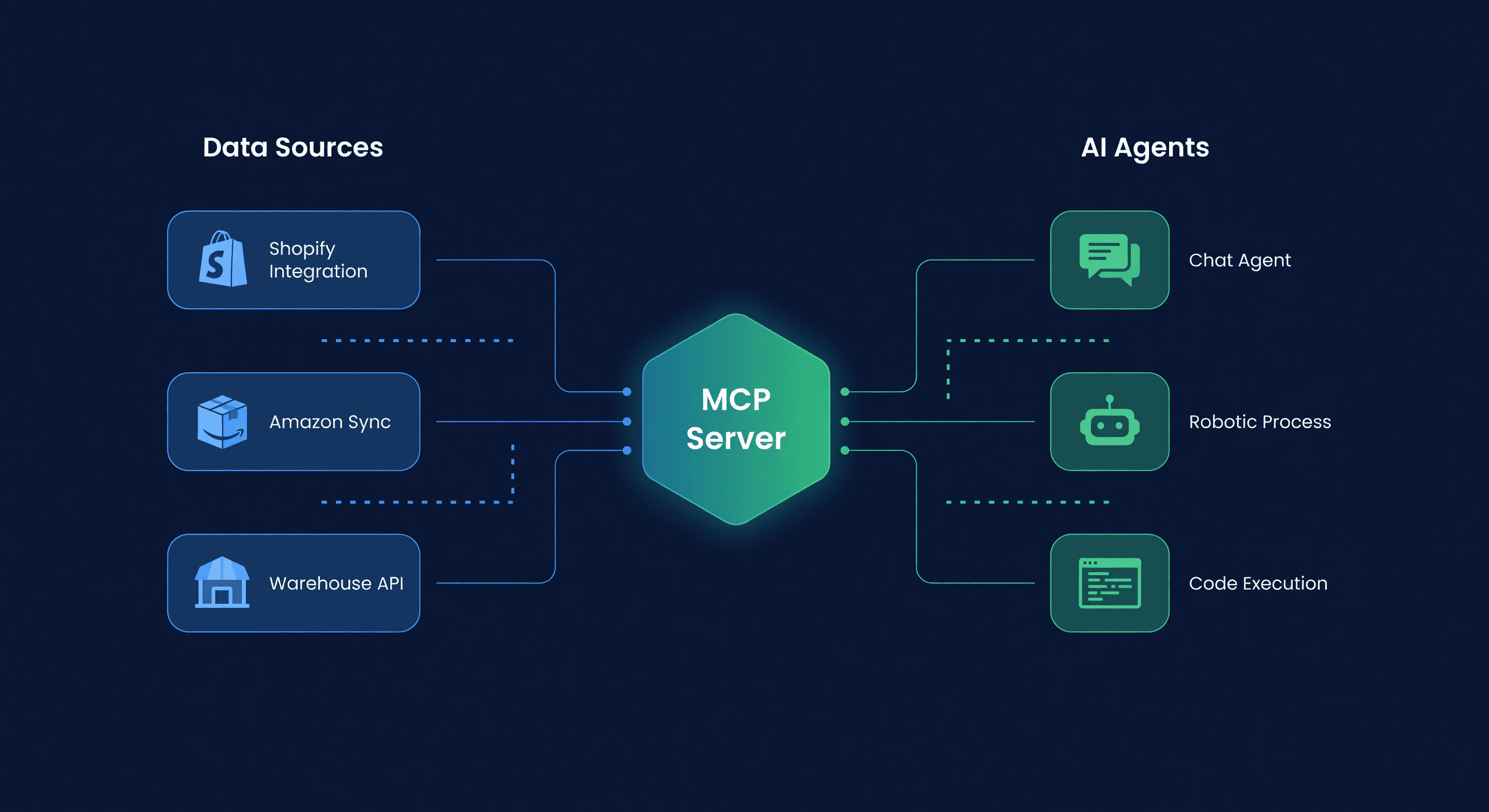
Connect Your AI Agent to Inventory (MCP Guide)
Key takeaway: MCP (Model Context Protocol) servers give AI agents structured access to live inventory data without sharing raw channel credentials. Agents can surface stockout risks, draft purchase orders, and answer inventory queries in seconds versus 20-minute manual checks.
I spent two years building inventory spreadsheets that were outdated by the time I finished them. Pulling stock levels from Shopify, cross-referencing FBA quantities, checking which SKUs needed reorders - that was a Tuesday. Every Tuesday. For two years.
Then I connected an AI agent to our inventory data and asked it: "Which SKUs will stock out in the next 14 days, and what should I order?" It answered in four seconds. With quantities. Accounting for lead times, MOQs, and the fact that my main supplier takes an extra week in March.
That is what this guide is about. Not theory. Not "the future of AI in e-commerce." A working setup you can have running in five minutes.
What You Can Actually Ask Your Agent
Before we get into setup, here is what becomes possible once your agent has access to live inventory data. These are real queries, not marketing demos:
| Query | What the Agent Does |
|---|---|
| "Which SKUs stock out in the next 14 days?" | Calls rr_get_stockout_risk, returns a ranked list with days-of-supply remaining |
| "Show me inventory for Blue Widget across all channels" | Calls rr_get_inventory_position, returns Shopify on-hand, FBA available, FBA inbound, and total |
| "Draft a PO for everything I need from Supplier X" | Calls rr_get_suggested_purchase_orders filtered by supplier, then rr_create_purchase_order as a draft |
| "What does my demand forecast look like for next month?" | Calls rr_get_demand_forecast with a 30-day horizon |
| "Any alerts I should know about?" | Calls rr_get_alerts - stockout warnings, overstock flags, sync failures |
| "Trigger an inventory sync" | Calls rr_trigger_sync to pull fresh data from Shopify and Amazon |
The agent is not guessing. It is calling specific tools with structured inputs and getting structured outputs. No prompt engineering tricks, no "pretend you are an inventory manager." Just data.
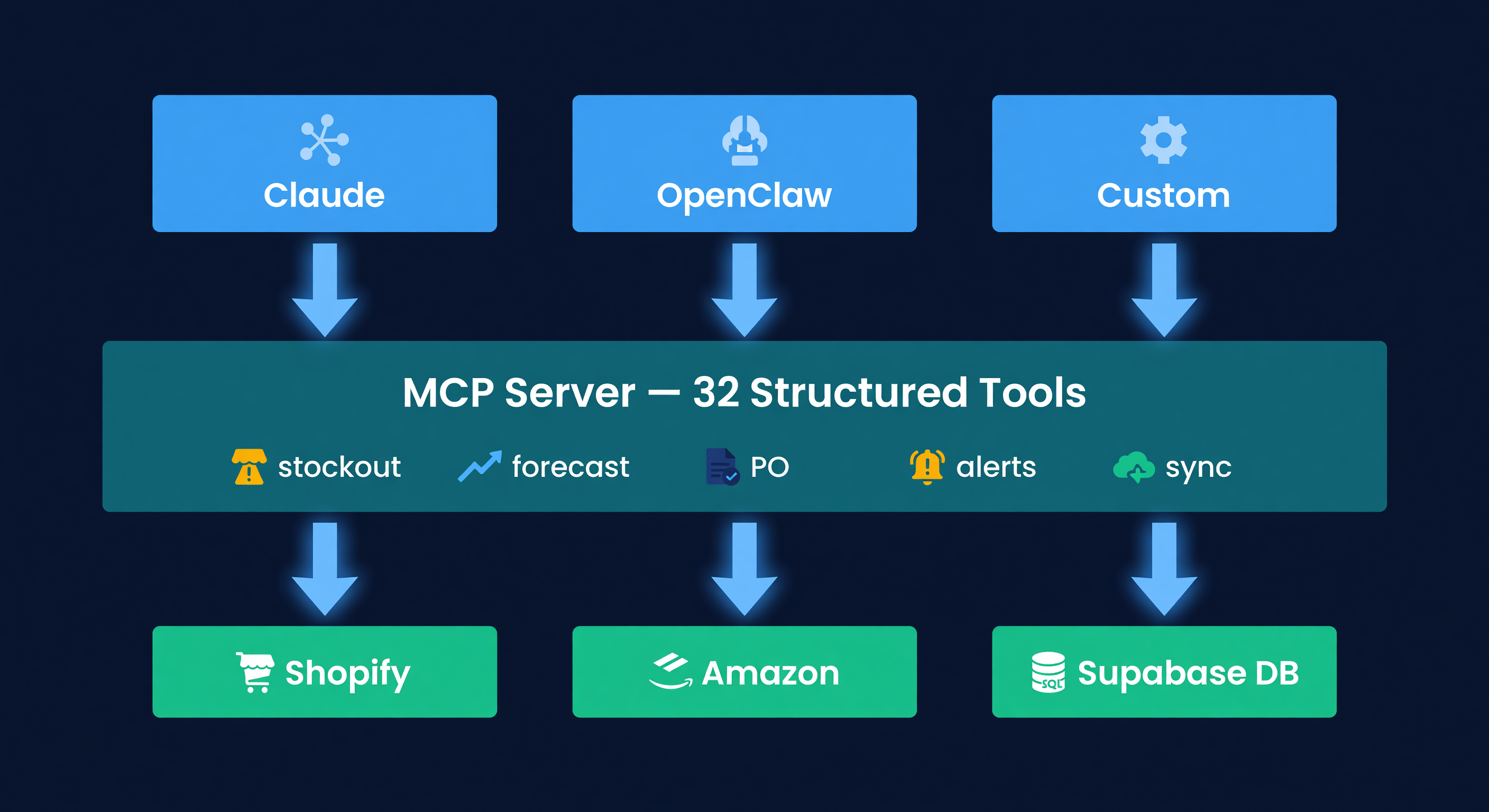
MCP: The Protocol That Makes This Work
MCP stands for Model Context Protocol. It is the standard that lets AI agents call external tools in a structured way - request a specific action, get a specific response, with type safety and error handling.
Anthropic created it, and MCP-compatible clients have spread across the agent ecosystem. Shopify has started exposing commerce data through MCP-style surfaces, and Amazon's Agent Policy gives sellers a clearer path for approved agent access. The signal is clear: agents need structured, permissioned ways to interact with commerce infrastructure.
ReplenishRadar ships an MCP package purpose-built for multi-channel inventory across both Shopify and Amazon. The tools it exposes are not generic "run a query" endpoints. They are domain-specific: stockout risk, demand forecasts, purchase order suggestions, reorder point calculations, alert monitoring. The math that powers your forecasting and purchase orders is the same math the agent calls.
5-Minute Claude Desktop Setup
This is the fastest path. If you use Claude Desktop, you are three steps from live inventory data in your conversations.
Step 1: Get Your API Key
Log into ReplenishRadar. Go to Settings > API Keys. Click "Create API Key", give it a label (for example, "Claude Desktop"), choose the capabilities and tool groups this agent should have, and copy the key. You will not see it again.
The key is scoped to your organization. It cannot access other accounts, and it inherits your tier's permissions and rate limits: Standard gets 10 calls per hour, Growth gets 100, and Scale gets 1,000.
Step 2: Edit Your Config
Open ~/.claude/claude_desktop_config.json and add the ReplenishRadar local MCP server:
{
  "mcpServers": {
    "replenishradar": {
      "command": "npx",
      "args": ["-y", "@replenishradar/mcp-server"],
      "env": {
        "REPLENISHRADAR_API_KEY": "rr_sk_your_key_here"
      }
    }
  }
}
Save the file. Restart Claude Desktop.
Step 3: Ask a Question
Open a new conversation and type: "What are my top stockout risks this week?"
Claude will call the rr_get_stockout_risk tool, pull your live inventory data, and answer with specific SKUs, days of supply remaining, and suggested reorder quantities. No CSV export. No tab-switching. Just the answer.
The whole thing took me about three minutes the first time. Most of that was finding the config file.
No Account Yet? Let the Agent Check Fit First
Agents do not need a full account to figure out whether ReplenishRadar is the right surface. They can read GET /api/public/agent-intake/schema, submit a profile to POST /api/public/agent-intake, and get a deterministic fit verdict. Qualified sandbox responses can include a short-lived, read-only sandbox key against synthetic demo data, so an agent can inspect the tool shape before a human starts a trial.
OpenClaw Setup
OpenClaw works too. The config is similar but lives in a different file:
{
  "tools": {
    "replenishradar": {
      "type": "mcp",
      "command": "npx",
      "args": ["-y", "@replenishradar/mcp-server"],
      "env": {
        "REPLENISHRADAR_API_KEY": "rr_sk_your_key_here"
      }
    }
  }
}
OpenClaw's advantage is persistent agent loops. You can set it to check stockout risk every morning at 7 AM and send a Slack message with the results. Claude Desktop is conversational - you ask, it answers. OpenClaw can run on a schedule without you being present.
For a comparison of when each approach makes sense, see our OpenClaw vs inventory software breakdown.
Custom Agents and REST API
If you are building your own agent on the Claude API, OpenAI API, or any other LLM, run the same npm package as a local MCP stdio server and let your tool-use layer discover the available tools.
For no-code setups, the same tools are available through the REST tool-call endpoint at POST https://api.replenishradar.com/api/mcp/call. n8n and Make users can call it directly with a Bearer token. The response format is JSON with typed fields. No MCP client required.
I would not recommend the REST path for complex agent workflows (the MCP protocol handles tool discovery and error propagation better), but for "poll stockout risk daily and send a Slack notification" it works fine.
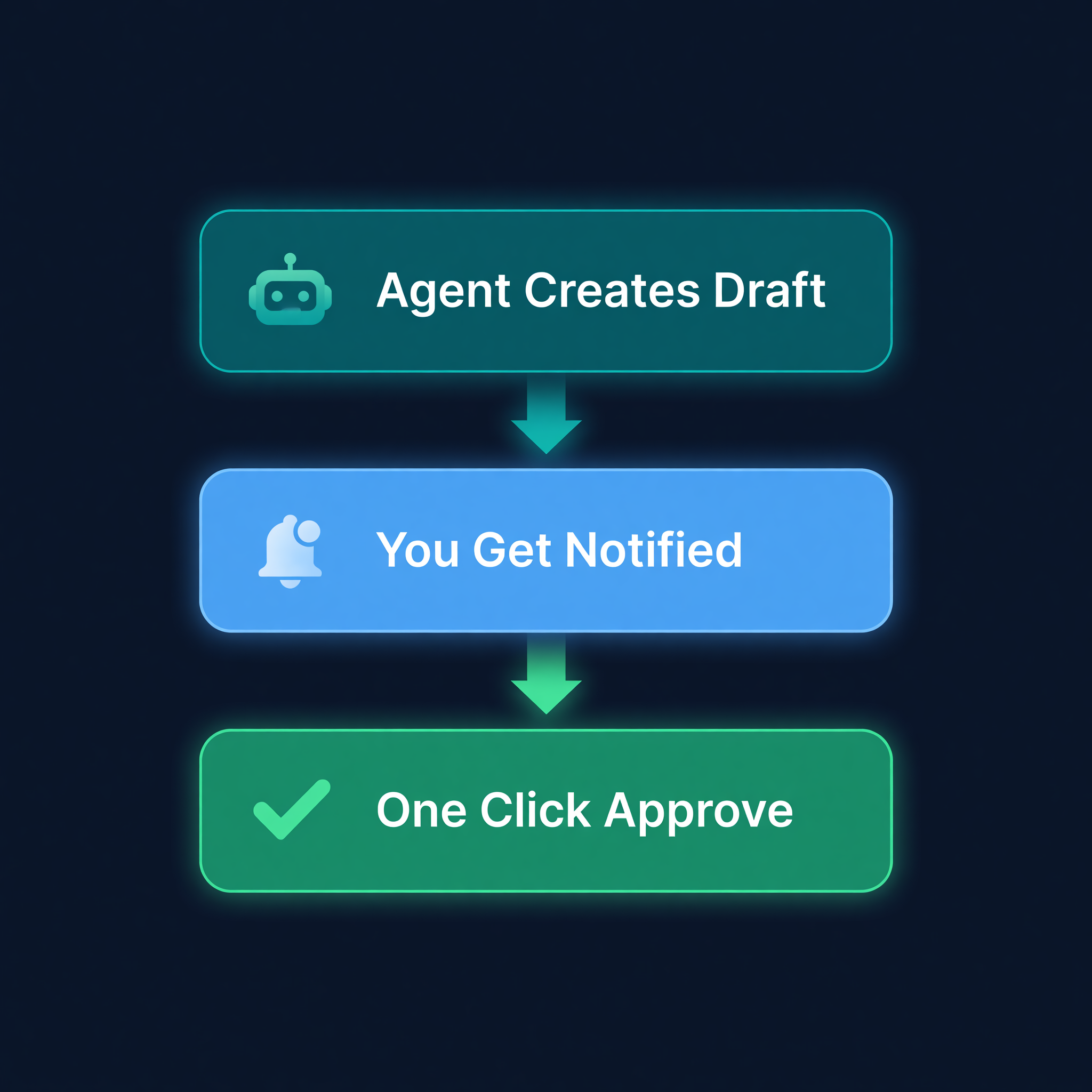
The Approval Flow (Why Agents Cannot Go Rogue)
Here is my opinion on why most sellers hesitate to connect an agent to their inventory: they are imagining an AI that places a $50,000 PO with their supplier at 2 AM on a Saturday. Reasonable fear. Terrible design.
The default purchasing path is built so that cannot happen. Every purchase order created through the public MCP flow starts as a draft, and ordinary agent keys cannot send it without an approval step.
When the agent drafts a PO, here is what actually happens:
- The agent calls
rr_create_purchase_orderwith supplier, SKUs, quantities, and a reason - ReplenishRadar creates the PO in draft status
- The agent or a workflow calls
rr_request_approvalto generate a signed approval URL - You click the link, review the PO details, and approve or reject
- Only after approval can
rr_send_purchase_ordersend the PO
The signed URL is org-scoped and time-limited. It cannot be forged or reused. Think of it as two-factor authentication for purchasing decisions.
This is the philosophy behind the whole MCP server package: rails, not a bot. ReplenishRadar provides the data, the math, and the guardrails. Your agent provides the interface. You provide the judgment.
What Each Tier Gets
Not every tool is available to every key. Tier controls the rate limit and maximum capability set. Each API key also has explicit capability and tool-group permissions, so a human admin decides what an agent can call.
| Tool Category | Standard ($99/mo) | Growth ($199/mo) | Scale ($499/mo) |
|---|---|---|---|
| Stockout risk, forecasts, alerts, and PO suggestions | Limited | Yes | Yes |
| Item, supplier, sync, and status data | Limited | Yes | Yes |
| Safe basic-action workflows | Yes | Yes | Yes |
| Direct PO creation (draft) | No | Yes | Yes |
| Trigger sync / set manual stock | No | Yes | Yes |
| API rate limit | 10/hour | 100/hour | 1,000/hour |
Standard gives you a limited evaluation path plus safe basic-action workflows. Growth adds direct draft PO creation, sync triggers, diagnosis/status reads, and notification workflows. Scale raises the limit for heavier scheduled automations.
A Real Morning With an Agent
I want to show what this looks like in practice, not in a demo environment but on a live catalog. Here is a condensed version of my Monday morning last week:
7:02 AM - I open Claude Desktop and type: "Morning briefing. Stockout risks, open alerts, anything weird."
The agent calls three tools: rr_get_stockout_risk, rr_get_alerts, rr_get_inventory_position for flagged SKUs. Response:
"3 SKUs at high stockout risk in the next 10 days. Your Bamboo Cutting Board has 47 units across channels with 8.2 units/day demand - about 5.7 days of supply. FBA inbound shipment of 200 units is in transit, ETA March 9. Your Silicone Spatula Set has 12 units, no inbound. Lead time from that supplier is 21 days. You also have a sync failure alert on your secondary Shopify store from last night."
7:03 AM - "Draft a PO for the Silicone Spatula Set. 500 units, same supplier as last time."
Agent calls rr_create_purchase_order, then requests approval. I get a notification with a link. I review the PO - supplier, quantities, estimated delivery date based on historical lead time - and approve it. Then rr_send_purchase_order can send the approved PO. Done before my coffee is ready.
7:05 AM - "Trigger a sync on the secondary Shopify store."
Agent calls rr_trigger_sync. The sync failure from last night was a transient API timeout. Fresh data starts flowing.
Three minutes. Three decisions made. No dashboards opened, no spreadsheets touched. I still use the ReplenishRadar UI for deep analysis and weekly planning, but the daily triage? The agent handles it.
What Agents Cannot Do (And Should Not)
I want to be clear about the boundaries. An agent connected to your inventory data is good at:
- Answering specific questions with current data
- Surfacing risks you would otherwise discover too late
- Drafting POs based on the system's suggestions
- Giving you a summary instead of making you hunt through tables
It is bad at:
- Deciding whether to launch a new product
- Negotiating with suppliers (please do not try this)
- Replacing your understanding of your own business
- Making judgment calls about promotional inventory
The agent sees the numbers. You see the context. A forecast might say you need 2,000 units of a seasonal product, but you know the trend is fading because TikTok moved on. The agent does not know that. You do.
The gap between "I should check my inventory" and actually having the answer used to be 20 minutes of clicking and filtering. Now it is a sentence. That shift changes what questions you bother to ask - and asking better questions is where the real value sits.
Start your free 14-day trial ->
Related Reading:
Frequently Asked Questions
Get notified when it matters
Amazon and Shopify change the rules constantly. We'll email you when something affects your business.
See what your inventory is really doing
Doing $5M+ in revenue? Talk to our team
Works with your AI agent
Ready for agents: MCP tools for live stock data OpenClawClaudeChatGPT
Related Posts
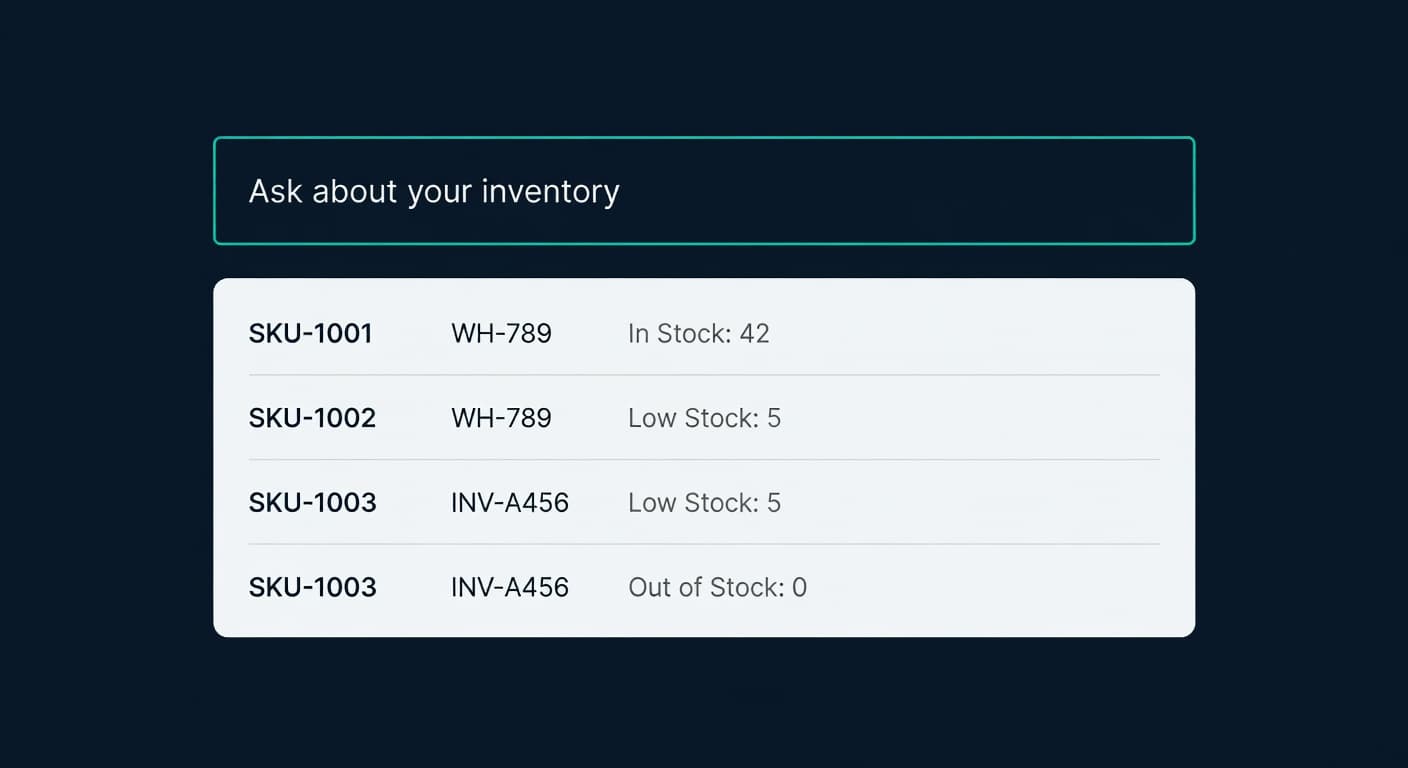
Ask Your Inventory a Question. Get a Real Answer.
Ask ReplenishRadar queries your live inventory data in plain English. Not a chatbot. Real numbers from your real stores, in seconds.
How to Handle Oversold Orders in E-commerce
Why overselling happens on multi-channel stores, what it costs you, and the prevention strategies that actually work, from buffer stock to real-time push sync.
Inventory Lite: Who It's For, What It Does, When to Upgrade
Lite is $9.99/mo for hybrid Shopify + Amazon sellers under 50 SKUs and $10k/30d. Here is what it covers and when you outgrow it.
